


 Everything you need to scale, built in













Historically, turning a software concept into reality required hiring costly agencies or spending months wrestling with complex code repositories. The Bolt AI builder directly solves this bottleneck. Acting as a “prompt-to-app” orchestrator, Bolt allows users to describe their desired application in natural language. The AI then writes the frontend code, configures the environment using in-browser WebContainers, and renders a live, working prototype in seconds.
Whether you are a founder testing an MVP, a product manager needing a quick internal tool, or a developer looking to accelerate your workflow, the market has exploded with options. Let’s break down the landscape. You can also check out our full review to see why and how Bolt stands out in the competitive no-code AI and vibe coding landscape.
 Our top picks for June 2026
 9.8
9.8

 Build with your design system
Bolt vs. The Competition: A Head-to-Head Comparison
When searching for Bolt alternatives, it is critical to match the tool to your technical skill level and end goal. Here is how Bolt stacks up against its biggest Bolt competitors at a glance:
Bolt AI
- Best For: Rapid full-stack prototyping
- Prompt-to-App Generation: ✅ Yes
- Code Export: ✅ Yes (React/Next.js)
- Learning Curve: Low
Base44
- Best For: MVP to finished app creation
- Prompt-to-App Generation: ✅ Yes
- Direct to App Store Publishing: ✅ Yes
- Learning Curve: Very low
Lovable
- Best For: High-end UI & UX design
- Prompt-to-App Generation: ✅ Yes
- Code Export: ✅ Yes
- Learning Curve: Low
v0 by Vercel
- Best For: Frontend UI components
- Prompt-to-App Generation: ✅ Yes (UI mostly)
- Code Export: ✅ Yes
- Learning Curve: Low
Replit Agent
- Best For: Developer-led coding
- Prompt-to-App Generation: ❌ No (Functions as an AI Co-pilot)
- Code Export: ✅ Yes
- Learning Curve: Medium/High
Bubble
- Best For: Complex visual no-code
- Prompt-to-App Generation: ❌ No (Visual drag-and-drop builder)
- Code Export: ❌ No
- Learning Curve: High
The Takeaway: If you need a fully functional, exportable full-stack application generated entirely from text prompts, Bolt AI and Base44 are currently leading the pack in speed and comprehensive execution.
Most Recommended AI App Builders & Bolt Alternatives 2026
Deep Dive: How Bolt Compares to Specific Workflows
- Bolt vs. Lovable (The Prompt-to-App Rivals) Lovable is currently the closest direct competitor. While Bolt code generation is incredibly fast for getting a functional full-stack prototype off the ground, Lovable leans heavily into design. If your app requires a highly polished, emotionally engaging user interface right out of the gate, Lovable might have the edge. However, Bolt is often praised for its fast backend connections and rapid deployment.
- Bolt vs. v0 by Vercel (The Frontend Specialist) If you are already in the React ecosystem, v0 is a powerhouse for generating beautiful UI components. However, v0 is primarily a frontend tool. A true Bolt AI integration allows you to scaffold both the UI and connect it to a database (especially with the newer Bolt Cloud features), making Bolt a more comprehensive standalone builder.
- Bolt vs. Replit & Cursor (The Developer Tools) If you actually want to read, learn, and manipulate the code, Replit and Cursor are superior. They are glass-box IDEs. Bolt is designed to abstract the code away so you can focus on the product.
- Bolt vs. Bubble (The No-Code Heavyweight) Bubble has been the king of visual no-code for years. While it now features AI plugins, it is a drag-and-drop builder, not a prompt-to-app generator. Bubble is better suited to highly complex, enterprise-grade logic, but it does not allow you to export your code. Bolt generates standard web code that you fully own.
What to Expect: Timelines & Deployment
When you choose to build an app with Bolt AI, the timeline from idea to execution is staggering:
- Minutes 1-5: You type your prompt. The AI generates the UI, sets up the framework, and renders a live preview in your browser.
- Minutes 5-30: You iterate. You ask the AI to change button colors, add new database fields, or refine the layout.
- Deploy: With a single click, you can push your application live to URLs via integrations with platforms like Netlify or Vercel. What used to take months of sprint planning now takes an afternoon.
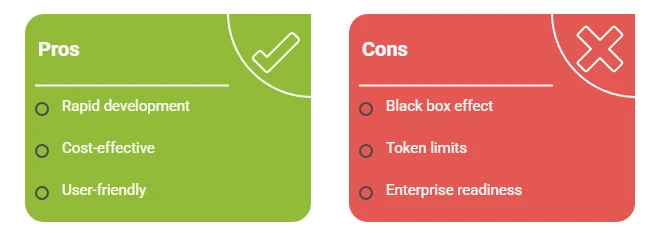
Potential Downsides & Side Effects
Relying entirely on an AI builder can have “side effects” for your business:
- The “Black Box” Effect: Because the AI writes everything, if a deeply complex bug occurs in the backend, non-technical founders may struggle to fix it without hiring a developer.
- Token Limits: Complex iterations consume AI tokens. Heavy users may find themselves hitting rate limits on lower-tier plans.
- Enterprise Readiness: While incredible for MVPs and internal tools, highly regulated industries (such as healthcare or finance) may require custom security compliance that out-of-the-box AI builders do not natively support.
Bolt Pricing & Cost Analysis
Is Bolt good value? Understanding Bolt pricing is key to managing your runway.
- Free Tier: Excellent for scaffolding simple ideas and testing the interface.
- Pro Tier (Approx. $20/month): This is the sweet spot for most users. It grants you significantly more tokens and the ability to build more complex, multi-page applications.
- The Value Play: Compare $20/month to the standard $100-$150/hour rate of a freelance full-stack developer. Even if you eventually hire a developer to polish the code, using Bolt to build the MVP saves thousands of dollars in initial development costs.
Buying Guide: How to Choose Your Builder
- Assess Your Goal: Are you building a quick internal dashboard? Bolt is perfect. Are you building the next Airbnb? You may want to start with Bolt for the MVP, but eventually transition to a custom build.
- Determine Code Ownership: If you want to own your code and host it anywhere, choose Bolt or Lovable. If you don’t care about code export, Bubble is a safe bet.
- Test the Prompts: Sign up for the free tiers of Bolt and its top competitor (like v0 or Lovable). Paste the exact same prompt into both and see which output you prefer.
Final Thoughts: Should You Build Your Next App With Bolt?
The landscape of software development is shifting rapidly, and the Bolt AI builder is undeniably at the forefront of that change. If you are a small business owner, entrepreneur, or product manager looking to validate an idea without burning through thousands of dollars in agency fees, Bolt is currently one of the most powerful tools at your disposal.
While it may not completely replace a senior engineering team for complex, enterprise-grade legacy systems, its ability to take you from a blank screen to a deployed, functional application in a single afternoon is unmatched.
The Bottom Line: Choose Bolt AI if you prioritize speed, want to own your exported code, and need a functional full-stack MVP immediately.
- Choose a Competitor if you strictly need high-fidelity visual design (Lovable) or require enterprise-level, drag-and-drop complexity without touching code (Bubble).
Stop letting the technical barrier to entry hold your business back. Review the top options in our comparison list above, and start building for free today.
Our top picks for June 2026
Frequently Asked Questions
Q: Can I use my own database with Bolt?
A: Yes. Through a Bolt AI integration, you can connect your generated frontend to backend databases like Supabase or Firebase, giving you real data persistence.
Q: Is Bolt better than ChatGPT for coding?
A: Yes, for full apps. While ChatGPT can write code snippets, Bolt provides an actual environment (WebContainers) where the code is instantly rendered and previewed. You don’t have to copy and paste code into a terminal.
Q: What happens if I want to leave Bolt?
A: Because Bolt generates standard web framework code (like React/Next.js), you can export your entire repository, push it to GitHub, and take it to any hosting provider you choose.
Q: Are there hidden costs in Bolt pricing?
A: The main subscription is straightforward, but remember that if you connect third-party databases (like Supabase) or hosting services, you will eventually need to pay those platforms as your user base scales.
