B12
Leah Goldberg
About the brand
B12 is an AI-powered website, store, and web app builder designed to help you move from idea to launch without starting from code. Instead of making you choose a template first and build every section manually, B12 lets you describe what you want to create, then generates a working online project around your prompt. For an app-builder audience, B12 is especially interesting because it goes beyond a basic brochure website. You can generate web app-style projects, dashboards, l...anding pages, business tools, client-facing portals, and app promo pages with sections, navigation, buttons, responsive layouts, and editable code. It also includes business-focused tools such as contact management, email marketing, contracts, eSignatures, online payments, invoicing, client intake, analytics, team access, and expert support, depending on the plan. B12 is best suited to entrepreneurs, creators, consultants, startups, and executives who want speed, structure, and a polished online presence without hiring a full development team from day one. Read more
8.5
Price
8.5
Ease of use
9.0
Features
8.0
Service
8.5
Overall
Our Verdict
B12 is a strong choice if you want to build and launch a web app, app landing page, dashboard, portal, online tool, or business-focused digital project quickly with AI. Its biggest strengths are speed, simplicity, clean design, AI chat editing, mobile responsiveness, team permissions, and built-in business tools.
It is especially useful for founders, creators, consultants, agencies, executives, and small teams that want to test an idea, publish a polished online experience, and start building a business around it without waiting months for development. The Website + Client Engagement plan offers the best value if monetization, client management, payments, intake forms, contracts, and email marketing matter to your app idea.
B12 may not be the right fit if you need a complex native iOS or Android app with app store deployment and deep device functionality. But if your goal is to move fast, validate an idea, and launch a professional AI-generated web app or app-style business presence, B12 is definitely worth considering.
Pros
-
Very fast AI project generation
-
Free plan available
-
Strong business tool set
-
AI chat editing saves time
-
Mobile-responsive designs
-
Code access adds flexibility
Cons
-
Free plan has limited credits
-
No money-back guarantee
Products & Pricing
B12’s pricing feels competitive when you compare it to the cost of hiring a designer, developer, copywriter, and business tool stack separately. It is not the cheapest AI builder if all you want is a very basic one-page site. Still, it becomes more interesting when you want an AI-generated project with hosting, editing, business tools, team management, and client engagement features in one place.
The standout offer is the limited-time promotion of $1/month for the first 3 months on paid plans. After that, the Website plan is listed at $49/month, while the Website + Client Engagement plan is listed at $78/month. Annual billing is also available with a displayed 15% saving.
In-depth review
How Fast Can You Launch?
Speed is one of B12’s strongest advantages. You can begin with a single idea and quickly generate a structured online project. From there, you can preview, edit, update, and publish without going through a long development cycle.
For an entrepreneur or executive, that matters because speed often determines whether an idea gets tested or stays stuck in the planning stage. B12 helps you create something tangible quickly, which is especially useful for MVPs, app validation, campaign launches, service portals, and product landing pages.
How Good Is It for Monetization?
B12 is not just about making something look good. The higher plan includes practical monetization and client workflow tools such as online payments, invoicing, intake forms, contracts, eSignature, email marketing, and contact management.
That makes B12 a better fit for business-oriented app builders than hobby-only builders. You can use it to create a professional front end for your offer, capture leads, manage contacts, handle client intake, and support payments, depending on the plan you choose. If your app idea connects to consulting, coaching, agency work, local services, online services, or digital products, those tools can help you turn traffic into revenue.
How Professional Does the Final Result Feel?
B12-generated projects look polished enough for business use. They include clean navigation, bold hero sections, app-style buttons, responsive layouts, structured feature sections, and professional footer areas.
The final result still depends on the quality of your prompt, your editing, and the visuals you choose. B12 can provide a strong starting point, but you should still refine your messaging, replace generic images where needed, check every link, test the mobile view, and ensure the app concept is clear.
What Should You Check Before Paying?
Before upgrading, you should check exactly what your app needs. If your goal is a responsive web app, business tool, dashboard, lead funnel, client portal, or app promo site, B12 is a strong match. If your goal is native mobile app publishing, push notifications, device camera integrations, GPS, in-app purchases, or app store deployment, you should confirm whether B12 supports your specific workflow or whether you need an additional development platform.
This is especially important for iPhone and Android app builders. B12 can help you create a mobile-friendly web experience and an app-style marketing presence, but native app functionality may require extra steps.
Features & Functionality
AI Prompt-Based App Creation
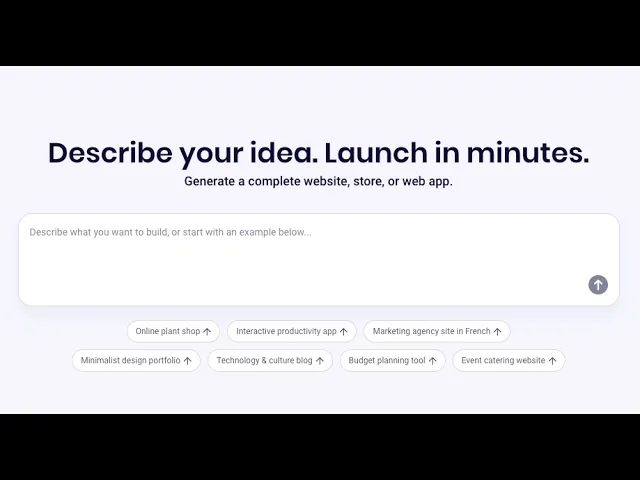
B12 lets you start with a plain-language prompt rather than a blank canvas. You describe the website, store, or web app you want to build, then B12 generates a structured project with content, sections, layout, navigation, and calls to action.
This is valuable when speed matters. You do not need to spend days wireframing an app concept before seeing whether the idea works. You can go from concept to a first draft quickly, then refine it with edits.
AI Chat Editing
The AI chat panel gives you a more modern way to edit your project. Instead of manually changing every color, paragraph, or section, you can ask the AI assistant to update your site, suggest pages, add blog post ideas, or make visual edits.
For non-technical users, this makes the editing process much less intimidating. For business executives, it also saves time because changes can be requested in natural language rather than handled through a complicated design interface.
Visual Editor and Code Access
B12 gives you both a visual website/app editor and a code view. This is an important advantage because different users need different levels of control. You can work visually when you want simplicity, but you can also inspect or edit code when the project requires more technical flexibility.
This makes B12 more flexible than a very basic no-code builder. If your app concept becomes more advanced, code access can make it easier to refine components, styling, or technical details with developer support.
Mobile-Responsive Web App Experience
B12 projects are designed to be mobile responsive, which matters for anyone building for iPhone and Android users. A mobile-responsive web app or landing page can be accessed via a mobile browser and deliver your audience a clean, app-like experience without forcing you to build separate native apps immediately.
However, B12 should be understood as an AI website, store, and web app builder rather than a guaranteed one-click native app store publisher. If your goal is a native iOS app in the Apple App Store or a native Android app in Google Play, you should confirm the publishing workflow before upgrading. B12 is better positioned for fast web app creation, app landing pages, dashboards, business tools, and mobile-friendly online experiences.
App Landing Pages and Download CTAs
B12 can help you create app-style landing pages with clear messaging, feature sections, benefits, and download buttons for iOS and Android. A project like a calorie-tracking app landing page can include a strong headline, product explanation, “How It Works” section, feature blocks, benefit sections, and app store-style buttons.
This is useful if you already have an app idea and need a fast-marketing site to collect leads, promote downloads, or explain your product before launch.
Business and Client Engagement Tools
The Website + Client Engagement plan gives B12 more business depth than many simple AI builders. Features such as online payments, invoicing, client intake, contact management, email marketing, contracts, eSignature, and file uploads help you turn a project into a real business system.
This is especially relevant if your “app” is not just a fun tool but a service-based business, agency portal, coaching platform, consulting workflow, appointment-based service, or lead-generation funnel.
Team Member Permissions
B12 lets you invite team members and control permissions. You can grant access to the website, account, billing, or client engagement tools. That matters if your app project involves a founder, an assistant, a developer, a designer, a marketer, or a client success person.
For executives and small teams, permissions reduce operational risk by ensuring that not every person needs full admin control.
Expert Marketplace
B12’s Expert Marketplace gives you access to vetted experts for design, copywriting, SEO, and marketing support. This makes B12 appealing if you want to start with AI but still have human help available when your project needs polishing.
This hybrid model is useful because AI can quickly build the structure, while an expert can help improve conversion, messaging, branding, and launch quality.
Mobile Optimization
B12 creates mobile-responsive projects, which is important if you want your app, landing page, dashboard, or business tool to look polished on iPhone and Android screens. This makes it easier to launch a web app-style experience that feels clean, modern, and accessible on mobile.
SEO Tools & Marketing
B12 includes marketing-friendly tools such as analytics, integrations, email marketing, contact management, and SEO support through its platform and expert marketplace. This is useful if you want your app project to attract traffic, capture leads, and grow beyond the first launch.
Social Media Tools
B12 can help you create app landing pages and business pages that connect clearly with your wider online presence. This is useful if you plan to promote your app through TikTok, Instagram, YouTube, Facebook, LinkedIn, or paid ads and need a professional destination for traffic.
eCommerce
B12 supports payments, invoicing, client intake, contracts, eSignature, and file uploads on the Website + Client Engagement plan. This is especially helpful if your app idea is connected to services, subscriptions, consultations, digital products, or client-based monetization.
Apps & Plugins
B12 includes integrations and access to a marketplace of expert services, giving you more flexibility than a basic standalone builder. This helps if you want your app project to connect with extra business tools or you need specialist help with design, SEO, copy, or marketing.
Special Features
B12’s strongest special features are AI prompt-based generation, AI chat editing, team permissions, code access, and built-in client engagement tools. These features make it a strong option if you want to build quickly, collaborate with others, and turn an app idea into a business-ready online project.
Design & Templates
B12 doesn’t feel like a traditional template-first builder where you scroll through hundreds of designs before you start. The experience is more prompt-driven. You describe the type of project you want, and B12 generates a design based on that idea.
This works well if you want speed and do not want to spend hours comparing templates. It also helps if your project is more specific than a standard small business website, such as a DevOps artifact launcher, calorie app, executive coaching site, invoice generator, online store, or dashboard-style tool.
The design quality is clean, modern, and business-friendly. Generated pages can include clear headers, navigation menus, calls to action, app-style layouts, feature sections, benefit sections, images, icons, and footers. You can edit visually, ask the AI assistant for changes, and use code access for deeper customization.
B12 may not be the best choice if you want total design freedom like a blank-canvas design tool. It is better for fast, polished, structured results that can be refined after generation.
Ease of Use
B12 is not a standard drag-and-drop builder in the old-school sense. It works more like an AI-assisted builder, where your prompt generates the initial version, and your editing happens through a combination of AI chat, visual editing, menus, settings, and code access.
This makes it very beginner-friendly at the starting point. You do not need coding skills to create your first project, and you do not need to understand web design to get a professional-looking structure. You can describe your idea, generate the project, preview it, adjust it, and publish it.
The setup flow is also clear. You are guided through steps such as editing the website, publishing, adding a custom domain, and learning about tools like contact management, email marketing, contracts, eSignatures, and team invitations.
For inexperienced users, the biggest benefit is speed. For more advanced users, the benefit is that you can still access the code and refine the project further. The only learning curve is understanding what B12 is best for: fast web apps, landing pages, dashboards, online business tools, and mobile-responsive projects, rather than complex native mobile apps that require app store deployment.
Customer Service
B12 offers a solid support setup with a Help Center, live chat, email support, scheduled call options, FAQs, videos, and access to vetted experts through the Expert Marketplace. Support is also built into the product experience through the B12 Assistant, which can answer questions and direct you toward human help when needed.
Phone Support
Phone support is available during business hours
Live Online Chat
Live chat is available through the support experience and in-product chat interface.
Email support is available to all customers and you can expect a reply within a few hours
User Reviews
Be the first to share your experience!
Leave a review to help others make smarter decisions.
Leah Goldberg
We make the best effort to present up-to-date information; however, the terms of each offer can be revised according to the service provider’s discretion. The above shall not be considered as an expert or professional advice for any matter.
8.5
Price
8.5
Ease of use
9.0
Features
8.0
Service
8.5
Overall
Thank you!