

Google Antigravity Review: The “Agentic” IDE (And Why Founders Should Avoid It)
Daniel Zvi
The Verdict: Google Antigravity (released Nov 18, 2025) is a groundbreaking platform that redefines the IDE for the "Agentic Era." Powered by the new Gemini 3 model, it allows developers to orchestrate autonomous AI agents that plan, execute, and verify complex software tasks.
However, make no mistake: This is a tool for software engineers. It requires a local desktop installation (Mac, Windows, Linux) and deep technical knowledge to manage.
If you are a founder, product manager, or business leader looking to build an app today without managing code files, you should skip the IDE and use an AI App Builder like Base44.
Here is the deep-dive review of Google Antigravity, followed by why Base44 is the better choice for business.
What is Google Antigravity? (For Developers Only)
Google Antigravity is not just another text editor with a chatbot sidebar. It is a fundamental rethink of the Integrated Development Environment (IDE) designed to let agents "autonomously plan and execute complex, end-to-end software tasks."
Unlike standard coding assistants (like GitHub Copilot) that wait for you to type, Antigravity introduces a "Manager View"—a mission control center where you assign high-level goals. The agents then utilize browser control capabilities and asynchronous interaction patterns to perform the work on your behalf.
Under the Hood: Gemini 3 & Model Optionality
While Antigravity is the flagship vessel for Google's most intelligent model, Gemini 3 Pro, it is surprisingly open. Google has included "Model Optionality," allowing developers to switch between:
- Google Gemini 3 (The default, optimized for agentic coding).
- Anthropic Claude Sonnet 4.5 (Known for high-quality reasoning).
- OpenAI GPT-OSS (For developers who prefer open weights).
Note on Usage: The Public Preview is free, but it comes with "generous rate limits" on Gemini 3 usage that refresh every five hours.
A Look Inside the "Manager View"
One of the most distinct features of Antigravity is the "Agent Manager" surface. This flips the paradigm: instead of the AI living inside your editor, your editor lives inside the AI's workflow.
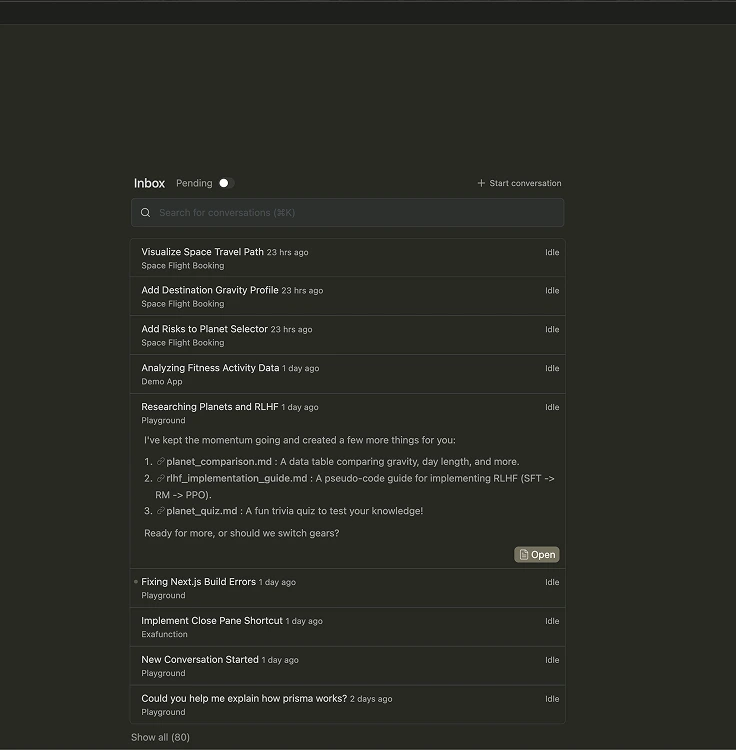
In the screenshot above, you can see how different parts of an app (like "Fitness Activity Data" or "Space Travel Path") are handled as separate workstreams. The status indicators (e.g., "Idle," "Pending") confirm that you are acting more like an Engineering Manager assigning tickets than a coder writing functions.
This confirms the complexity: effectively using this tool requires you to understand how to break down a large software architecture into small, assignable technical tasks.
The Killer Feature: "Artifacts" & Trust
The biggest problem with AI coding today is the "Trust Gap." Did the AI actually fix the bug, or did it just hallucinate a solution?
Antigravity solves this with Artifacts. As the agent works, it doesn't just output code; it produces tangible deliverables that demonstrate its understanding of the task.
- Task Lists & Implementation Plans: You can review the agent's strategy before it writes a line of code.
- Browser Recordings & Screenshots: Because the agent has "browser control," it can launch localhost, interact with the app it just built, and record a video to show you it works.
- Self-Improvement: The system treats learning as a core primitive. Agents contribute to a "Knowledge Base," learning from past work (e.g., derived architecture or useful snippets) to get smarter over time.
Google Antigravity: The Good & The Bad
✅ Pros:
- True Autonomy: Agents can spawn, orchestrate, and observe multiple workspaces in parallel.
- Verification: The "Artifacts" system (screenshots/logs) finally solves the "did it work?" problem without needing to read every line of code.
- Free (For Now): The Public Preview is free to download for Mac, Windows, and Linux.
❌ Cons:
- High Friction: This is a desktop app that likely requires a powerful machine to run smoothly.
- No Hosting: It builds code, not apps. You still need to manage your own AWS/Vercel deployment pipelines.
- Technical Ceiling: If the agent gets stuck, you need to know how to read the raw Python or React code to unblock it.
The "Skill Gap": Do You Actually Want an IDE?
Before you download Antigravity, ask yourself: "Do I want to write code, or do I want to build an app?"
Google Antigravity is a tool for Software Engineers. It generates raw code files that you have to maintain, secure, and deploy. If you are a business user who just wants a working product to sell or use internally, these AI App Builders are the better choice.
The "No-Code" Alternatives: Base44 vs. Lovable
If you don't want to manage a local development environment, you have two main options: Base44 (for functionality) and Lovable (for design).
1. The Best Choice for Business: Base44
 Our top picks for April 2026

 Ready to use, instantly
Base44 is the "Antigravity for Business." It takes the power of advanced AI (Gemini/Claude) but handles the entire backend infrastructure for you. Unlike Antigravity, which gives you code files to host yourself, Base44 gives you a fully hosted, secure application instantly.
- Why it wins: It is an "all-in-one" platform. It automatically sets up your database, user authentication, and hosting in the background. You just describe your business logic (e.g., "Build a CRM for my sales team"), and it builds a working tool.
- Key Advantage: One-Click Connectors. While Antigravity requires you to code API integrations from scratch, Base44 has pre-built connectors for tools like Salesforce, Slack, and Google Sheets.
2. The Choice for Designers: Lovable
Lovable is essentially "GPT-engineer" with a beautiful UI. It is fantastic for frontend prototyping because it generates clean React code that you can export to GitHub.
- The Good: It creates stunning user interfaces very quickly. If you are a designer who cares about pixel-perfect CSS, this is a great playground.
- The Catch: It is primarily a frontend tool. While it integrates with Supabase, you often have to manage that connection yourself. If you need complex business logic, permissions, or automated workflows, you will eventually hit a wall that requires a real developer to fix.
Verdict: Use Lovable for a pretty prototype. Use Base44 for a functioning business product.
Comparison: Which Tool Fits Your Goal?
| Feature | Google Antigravity | Base44 | Lovable |
| Primary Goal | Writing Code | Running a Business | Designing a UI |
| Output | Python/JS Files | Hosted Web App | React Code |
| Backend/DB | Manual Setup | Built-in & Managed | External (Supabase) |
| Skill Required | High (Engineering) | Low (Business Logic) | Med (Frontend) |
Final Thoughts
Google Antigravity is a glimpse into the future of software engineering. It shifts the developer's role from "writer" to "reviewer" through its autonomous agents.
- Download Google Antigravity if you are a developer who wants to use Gemini 3 to automate your coding workflows.
- Try Base44 if you are a founder who wants to launch a fully functional internal tool or MVP by lunch, without writing a single line of code.
Liked this article?
Daniel Zvi
Smart Recommendations


Thank you!