

How to Publish Native Mobile Apps with Base44 (New 2026 Feature)
Daniel Zvi
As of February 2026, the Base44 Native Mobile update allows users to publish native iOS and Android apps directly to the App Store and Google Play, completely eliminating the need for third-party wrappers like Median or Despia. This major infrastructure shift moves Base44 from a web-only builder to a true native platform.
To access this feature, you must first update your project to the 2026 Infrastructure. Once updated, the new workflow is found under Publish > Mobile App, where you can use the AI App Scan to audit your UI for safe areas before generating production-ready .ipa (iOS) and .aab (Android) binaries in the cloud. Available on the Builder+ plan, this update saves users approximately $500–$1,000 annually by including native compilation, system-level Push Notifications, and Biometric Authentication (FaceID) directly in the core subscription.
Part 1: Prerequisites (Before You Build)
Before generating your binary files in Base44, ensure you have the following external accounts active. Base44 cannot "bypass" these App Store requirements.
- Apple Developer Program: Enrolled as an Individual or Organization ($99/year). You will need your Issuer ID and API Key.
- Google Play Console: Active developer account ($25 one-time fee). You will need your service-account.json file.
- Base44 Plan: The "Native Build" feature is exclusive to the Builder+ tier and above.
Step-by-Step Publishing Guide
Step 1: Unlock the "Mobile App" Tab
If your Publish menu only shows "Web," your project is running on the legacy engine.
- Action: Go to Settings > Project Updates and click "Update Infrastructure to 2026".
- Result: A new tab labeled Mobile app will appear in the Publish dropdown.
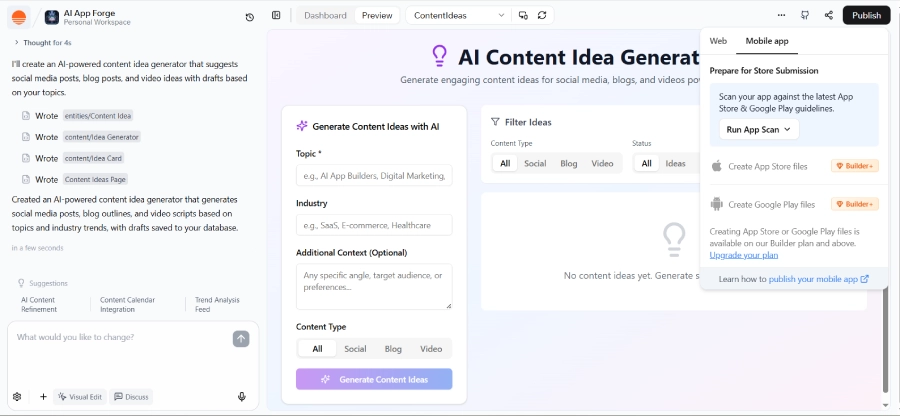
Step 2: Run the "App Scan"
What is it? An AI-powered audit that prevents instant rejection from Apple/Google.
- Click: Run App Scan inside the Mobile App tab.
- The AI Check: It verifies that all touch targets are at least 44x44 points and that your UI respects "Safe Areas" (notches/home bars).
- Auto-Fix: If the scan fails, click "Resolve with AI" to have Base44 automatically adjust padding and button sizes.
Step 3: Generate Native Binaries
Note: This happens in the cloud. You do not need Xcode or Android Studio.
- For iOS: Click Create App Store files. This generates the .ipa file (approx. 15 mins).
- For Android: Click Create Google Play files. This generates the .aab (Android App Bundle).
Step 4: Direct Store Submission
Once files are generated, you do not need to download them.
- Link Accounts: Enter your Apple API Key and Google JSON key into the Integrations modal.
- Submit: Click the "Submit to Store" button. This automatically pushes your build to TestFlight (iOS) and Internal Testing (Android).
 Our top picks for April 2026

 Ready to use, instantly
Troubleshooting Common Errors
| Error Message | Likely Cause | Solution |
| "Build Failed: Asset Missing" | You haven't uploaded an App Icon or Splash Screen. | Go to Settings > Brand Assets and upload a 1024x1024 PNG. |
| "Safe Area Violation" | Content is overlapping the iPhone notch. | Run the prompt: "Add safe-area padding to all headers." |
| "Invalid Entitlements" | You requested a permission (e.g., Camera) you didn't declare. | Go to Mobile Settings and toggle "Camera Usage" ON. |
| "Upgrade Required" | You are on the Free/Starter plan. | Upgrade to Builder+ to unlock native file generation. |
Native vs. Wrappers (Why Switch?)
| Feature | Base44 Native (New 2026) | Wrappers (Median/Despia) |
| Annual Cost | Included in Plan ($0 extra) | $500 - $980 / year |
| Push Notifications | System Native (Free) | Paid Add-on |
| Biometrics (FaceID) | One-Click Integration | Complex Setup |
| App Updates | Over-the-Air (Instant) | Requires App Store Review |
Frequently Asked Questions
Q: Do I need a Mac to publish a Base44 iOS app?
A: No. Because Base44 handles the compilation of the .ipa file in the cloud, you can publish to the Apple App Store from a Windows or Linux machine.
Q: Can I update my app without re-submitting to the App Store?
A: Yes. For UI and logic changes, Base44 uses "Over-the-Air" (OTA) updates. Users will see the new version immediately next time they open the app. You only need to re-submit binaries if you change native permissions (like adding FaceID).
Q: What happens if my App Scan fails?
A: If the App Scan fails, do not ignore it. It means your app violates a specific UI guideline (usually button size or text contrast). Use the "Resolve with AI" button to fix these issues automatically before regenerating the build.
Q: Does Base44 Native work with existing Bubble backends?
A: Yes. You can use Base44 as your native mobile frontend while keeping your data in Xano, Supabase, or Bubble.
Liked this article?
Daniel Zvi
Smart Recommendations





Thank you!